Side by side
| Mind map | Concept map | |
|---|---|---|
| Structure | One central topic, branching outward like a tree | Several hubs, a network of ideas |
| Lines | Usually unlabelled: "belongs to" | Always labelled: "causes", "requires", "is part of" |
| Cross-links | Occasional | Essential, many-to-many |
| Best for | Brainstorming, notes, planning, outlines | Understanding systems, studying, teaching, care plans |
| Speed | Fast, loose, associative | Slower and more deliberate |
| Origin | Popularised by Tony Buzan, 1970s | Developed by Joseph Novak's team at Cornell, 1970s |
| Reads as | A tree of topics | A set of statements ("plants produce oxygen") |
The same topic, both ways
As a mind map, Photosynthesis sits in the centre with branches for Inputs (sunlight, water, CO₂), Outputs (glucose, oxygen), Where (chloroplasts, leaves) and Why it matters. It's quick to make and good for a revision summary.
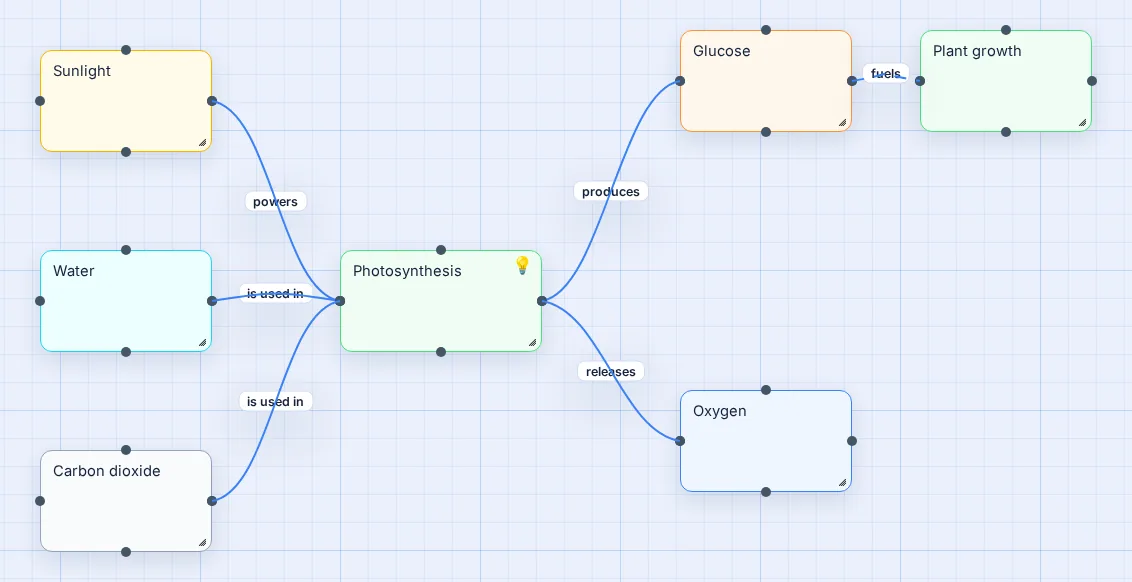
As a concept map, the same ideas are linked with statements: sunlight powers photosynthesis; water and CO₂ are used in it; it produces glucose and releases oxygen; glucose fuels plant growth. It takes longer, but it shows that you understand the process, not just its parts.
When to use which
- Starting from nothing? Mind map. Get ideas out first.
- Need to explain cause and effect? Concept map.
- Planning a project, an essay or an event? Mind map. Then turn branches into tasks.
- Studying biology, nursing, economics or history? Concept map for the hard topics, mind map for the summaries.
- Documenting a process with decisions? Neither; that's a flowchart.
- Drawing how devices connect? That's a network diagram: boxes and labelled links again, with right-angle lines.
And the other names you'll see
Spider diagram, bubble map, idea map, brainstorm map: all mind maps. Knowledge map, semantic network: close cousins of the concept map. Flowchart: a different thing, a process in order. Network diagram: also different, showing hardware and connections, though it's drawn with the same boxes and lines.
Ready to make one? Start with how to make a mind map or the concept map maker.
Questions people ask
Mind map vs concept map: which should I use?
Use a mind map to generate and organise ideas around one topic: brainstorming, notes, planning. Use a concept map to explain how ideas relate: studying a system, teaching, or care plans. If you find yourself wanting to write words on the lines, you need a concept map.
What is the main difference between a mind map and a concept map?
The links. On a concept map every line has a label that states the relationship, so each link reads as a sentence. On a mind map lines are usually unlabelled and simply show that a sub-idea belongs to a branch.
Mind map vs flowchart: what is the difference?
A flowchart shows a process in order, with steps, decisions and arrows from start to end. A mind map shows related ideas with no fixed order. Use a flowchart to document a sequence and a mind map to explore a topic.
Is a spider diagram a mind map?
Yes, essentially. Spider diagram, bubble map, idea map and brainstorm map all describe a diagram radiating from one central idea, which is a mind map.
Can one tool make both?
Yes. In Vision Mapr a mind map and a concept map are made the same way: add ideas and connect them. Leave the lines unlabelled for a mind map, or click each line and type a linking phrase for a concept map.