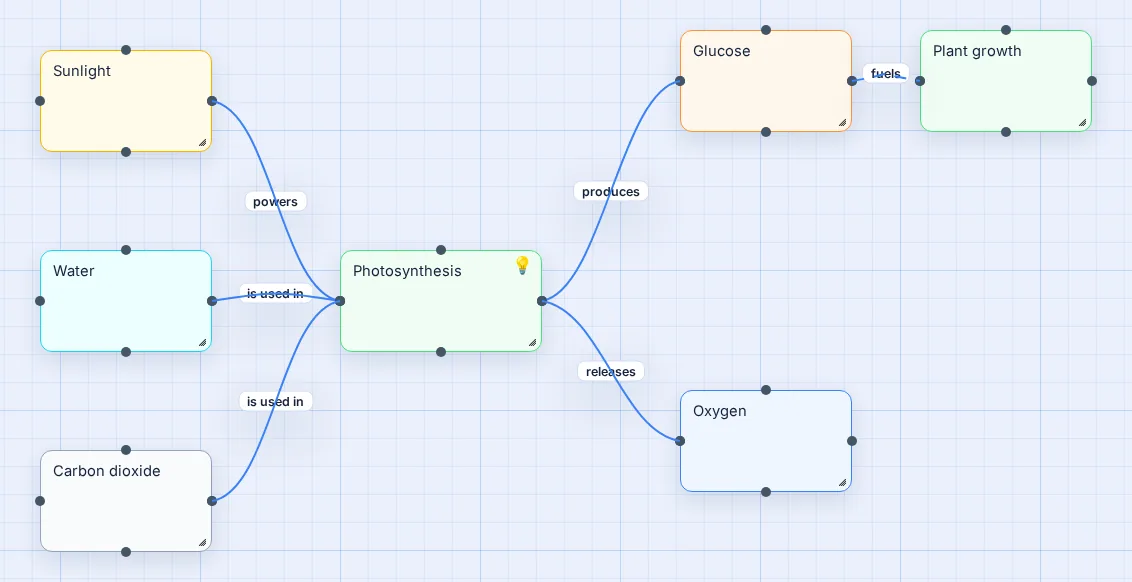
How to make a concept map, step by step
- Write a focus question. For example How do plants make food? or What causes inflation? A concept map answers a question; the question keeps it on track.
- List the key concepts. Nouns, 10 to 20 of them: sunlight, water, chlorophyll, glucose. Don't connect anything yet.
- Put the most general concepts at the top or centre and the specific ones further out.
- Connect and label. Draw a line between two related concepts and write the relationship on it. Read it aloud: water is used in photosynthesis. If it doesn't read as a sentence, fix the label.
- Add cross-links. Look for relationships between distant parts of the map. Cross-links are where real understanding shows.
- Revise. Move things, merge duplicates, sharpen vague labels like related to. Concept maps get better on the second pass.
Why the labels matter
An unlabelled line only says "these two are related". A labelled line says how: causes, prevents, is a type of. That's the whole point of a concept map. Writing the label forces you to decide what you actually believe about the relationship, which is why teachers use concept maps to check understanding, and why they work so well for studying.
In Vision Mapr, click any connection and a small editor opens with a label field, colour swatches and five line styles. Every line has an arrowhead, so direction is clear; use the dashed style for weaker or indirect relationships.
Good linking phrases to use
| Relationship | Linking phrases |
|---|---|
| Cause and effect | causes, leads to, results in, prevents, increases, reduces |
| Parts and types | is part of, includes, consists of, is a type of, is an example of |
| Process | produces, is converted to, is used in, requires, releases |
| Logic | supports, contradicts, depends on, is evidence for |
| Clinical (nursing) | evidenced by, related to, treated with, monitored by, expected outcome |
Where concept maps shine
- Science and biology: processes such as photosynthesis, the water cycle or body systems.
- Nursing care plans: linking a diagnosis to its evidence, interventions and outcomes.
- History and social studies: causes and consequences of events.
- Teaching: checking what a class understands before and after a unit.
- Systems at work: how teams, tools and processes depend on each other.
Not sure whether you need a concept map or a mind map? See mind map vs concept map.
Questions people ask
What is a concept map?
A concept map is a diagram of ideas (concepts) connected by labelled lines that explain how they relate, for example "sunlight powers photosynthesis". Unlike a mind map it can have several hubs and many cross-links. The technique was developed by Joseph Novak and his team at Cornell in the 1970s.
Can I make a concept map for free without signing up?
Yes. Open Vision Mapr's Concept Map example or a blank canvas with no account, add concepts, connect them and type a label on each connection. Create a free account only if you want to save it to the cloud or share a read-only link.
How do I make a concept map for nursing?
Put the patient's main problem or diagnosis in the centre. Around it, add assessment data, contributing factors, nursing interventions and expected outcomes, and link them with phrases like "evidenced by", "caused by", "treated with" and "leads to". Colour code each category so the plan reads at a glance.
What are linking words in a concept map?
They are the short phrases written on each line, usually a verb: causes, requires, produces, includes, is a type of, leads to, depends on. Together with the two concepts they make a proposition, a small true statement such as "plants produce oxygen".
What is the difference between a concept map and a mind map?
A mind map branches from one central topic and its lines are usually unlabelled; it suits brainstorming and notes. A concept map can have several hubs and every line is labelled to explain a relationship; it suits studying how a system works. In Vision Mapr the only difference is whether you label the lines.
Can I export my concept map?
Yes. Export PNG saves the whole map as an image regardless of zoom, and Print gives a clean canvas-only layout. With a free account you can also share a read-only link that anyone can open without signing up.