What is a mind map?
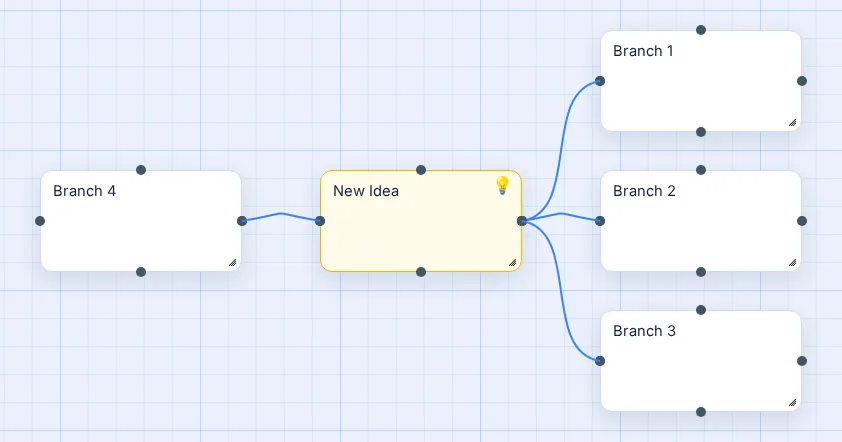
A mind map is a diagram that starts from one central idea and branches outward into related topics, then into details. Because it's spatial instead of a list, you can see how ideas relate at a glance. That makes it good for brainstorming, planning, note-taking and revision. The technique was popularised by Tony Buzan in the 1970s, but people have drawn branching diagrams for centuries.
How to make a mind map in 6 steps
1. Put one topic in the centre
Write the subject, question or goal in a single box in the middle: Product launch, World War I causes, Wedding plan. Keep it to a few words. If you can't name the centre, the map will wander.
2. Add 3 to 7 main branches
These are the big themes. For a product launch that might be Research, Build, Launch and Measure. Fewer than three and you probably need a list; more than seven and some of them belong under another branch.
3. Add details as sub-branches
Under each main branch, add the specifics: tasks, facts, examples, questions. Keep going a level or two deeper where it helps. In Vision Mapr, select a node and press Tab to add a connected child, or Enter to add a sibling next to it.
4. Use colour on purpose
Give each main branch its own colour and let its children follow it. Colour is the fastest way for the eye to group things. You can also use colour for status, for example green for done and red for blocked.
5. Connect ideas across branches
The best insights are often links between branches: a risk in one area that affects another, a fact that supports two arguments. Draw those lines and, if it helps, label them (causes, depends on). A map with labelled links is turning into a concept map, which is fine.
6. Tidy up and review
Once ideas stop coming, clean up. Click Tidy Up to auto-arrange the map into a radial tree, merge duplicates, and shorten any label longer than five words. Then export a PNG, print it, or share a read-only link.
Keyboard shortcuts that make it fast
| Key | What it does |
|---|---|
| Double-click canvas | Add a node (auto-connects to the one before, unless you turn Auto-connect off) |
| Tab | Add a connected child to the selected node |
| Enter | Add a connected sibling |
| Delete / Backspace | Remove the selected node(s) or connection |
| Ctrl/Cmd + Z / Y | Undo / redo |
| Shift + drag | Select a region of nodes |
| Ctrl/Cmd + A | Select the whole map |
Mind map examples to copy
- Essay plan: thesis in the centre, one branch per paragraph, evidence underneath, a counter-argument off to the side. There's an Essay Plan template.
- Revision: exam topic in the centre; branches for key terms, dates, formulas and examples; colour by how well you know each one.
- SWOT analysis: the decision in the centre with Strengths, Weaknesses, Opportunities and Threats around it. See all templates.
- Project plan: goal in the centre; branches for goals, tasks, timeline and resources.
- Brainstorming: a problem in the centre and ten minutes of every idea you can think of, sorted afterwards. More in the brainstorming guide.
Mistakes to avoid
- Sentences on branches. If a label wraps onto three lines, it's a note, not a branch.
- Everything off the centre. Twenty branches straight off the middle is a list in a circle. Group them.
- No colour, or rainbow colour. Colour should mean something: one per branch or one per status.
- Never tidying. Brainstorm messily, then spend two minutes arranging. Tidy Up does most of it in one click.
Questions people ask
How do I make a mind map online for free?
Open Vision Mapr and click "Try it now"; no account is needed. Double-click the canvas to add your central idea, press Tab to add a branch and Enter to add a sibling, drag things where you want them, and click Tidy Up to arrange the map. Export it as a PNG when you are done.
How many words should each branch have?
One to five. Short keywords are faster to scan and easier to remember than sentences. If you need more detail, put it inside the node as rich text, or as a smaller sub-branch.
What makes a good mind map?
One clear central topic, a handful of main branches, short labels, a colour per branch and a few cross-links that show how ideas relate. A good mind map can be read in under a minute and still has room to grow.
Can I make a mind map on my phone or laptop?
Yes. Vision Mapr runs in the browser on laptops, desktops, tablets and phones. On touch screens you tap to select, drag to move, pinch to zoom and double-tap to add or edit a node. There is nothing to install.
Is a spider diagram the same as a mind map?
Essentially, yes. Spider diagram, bubble map, idea map and brainstorm map are all names for a diagram that branches out from one central idea. The steps on this page work for all of them.
Should I make a mind map by hand or digitally?
Both work. Paper is great for a quick five-minute burst. Digital wins when the map will grow, change or be shared: you can move branches without redrawing, undo mistakes, search, and export a clean image.